JCE cannot authenticate the provider BC
 相关资料:
相关资料: 解决方案,
解决方案, 白皮书,产品介绍,产品比较,
 开发文档,
开发文档, 成功案例,
成功案例, 产品源代码,
 授权码工具,
 个人版价格,企业版价格,政企版价格,年费版价格,OEM版价格,源码版价格,基础组件,
 示例下载,控件升级,
 在线演示,
在线演示, 在线文档,并发能力,上传速度,下载速度,
 Windows控件安装,
 macOS控件安装,
 deb控件安装,
 rpm控件安装,安装引导,控件部署,控件升级,
 IE9加载控件,
 IE8加载控件,
示例下载: asp.net-vs2013,
 asp.net-vs2010,
 jsp-eclipse,
 jsp-springboot,
 jsp-myeclipse,
 php,
php, vue-cil,
 WinForm(C#),
 C++(WTL),
 视频教程:php7测试,php5测试,
 vue-cli-测试,
 asp.net-IIS Express测试,asp.net-IIS测试,
 asp.net-阿里云(oss)测试,
 asp.net-华为云(obs)测试,jsp-springboot测试,
 sm4加密传输,压缩传输,
 Discuz集成,
 源码编译:
源码编译: ActiveX(x86),ActiveX(x64),Windows(npapi),NativeMessage,macOS,Linux(海光,兆芯),arm(鲲鹏,飞腾),
 龙芯mips,
 龙芯LoongArch,
 ASP.NET教程:asp.net,
 IIS Express,IIS,IIS-Https,
 Oracle,
 minio,fastdfs,
 阿里云对象存储(oss),
 华为云对象存储(obs),jsp-eclipse教程:测试教程,oracle,
 mysql,
 SQL Server,minio,fastdfs,阿里云对象存储(oss),华为云对象存储(obs),
jsp-springboot教程:测试教程,minio,fastdfs,阿里云对象存储(oss),华为云对象存储(obs),
jsp-myeclipse教程:mysql,oracle,SQL Server,fastdfs,
php教程:测试教程,minio,fastdfs,阿里云对象存储(oss),
 教程:WinForm(C#)测试,WTL(C++)测试,在vue.js中使用,在vue-cli中使用,
 eclipse导入up6,组件引用,自定义事件,自定义业务字段,自定义文件保存路径,授权码,加密存储,加密传输,使用Minio存储,使用FastDFS存储,
 使用达梦数据库,数据表字段设计,监控fd_create流程,监控f_create流程,监控f_list.jsp流程,
 相关问题:WebSocket连接失败,md5计算完毕后卡住,域名未授权,网站安全系统拦截,
 联系我们:
联系我们: QQ:1269085759(技术),QQ:3040217208(售后),QQ:1085617561(商务),
 微信:13235643658,
 邮箱:1269085759@qq.com,1085617561@qq.com,qwl@ncmem.com,








错误提示:
JCE cannot authenticate the provider BC
解决方案:
1. 在java安装目录下找到 jre/lib/security/java.security文件,
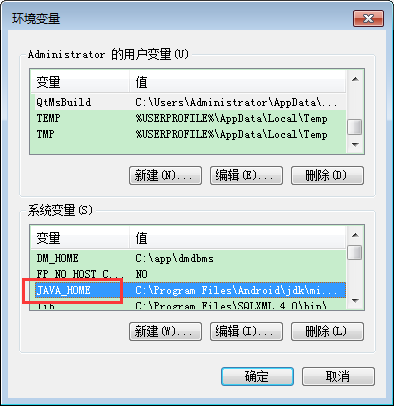
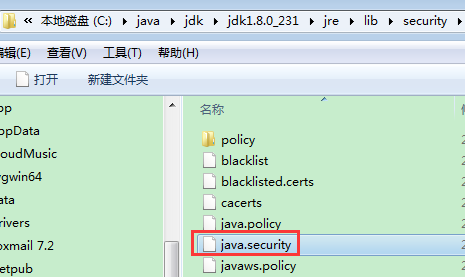
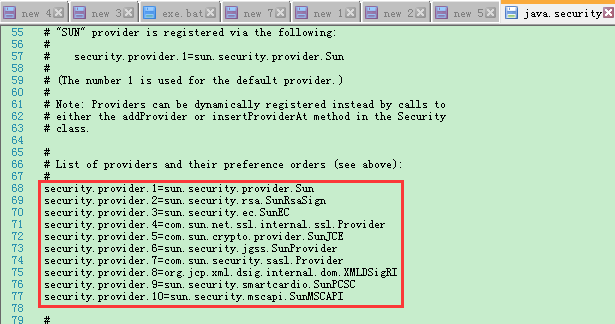
添加一行:security.provider.11=org.bouncycastle.jce.provider.BouncyCastleProvider //这里的11是序号,根据已有的往下排就行
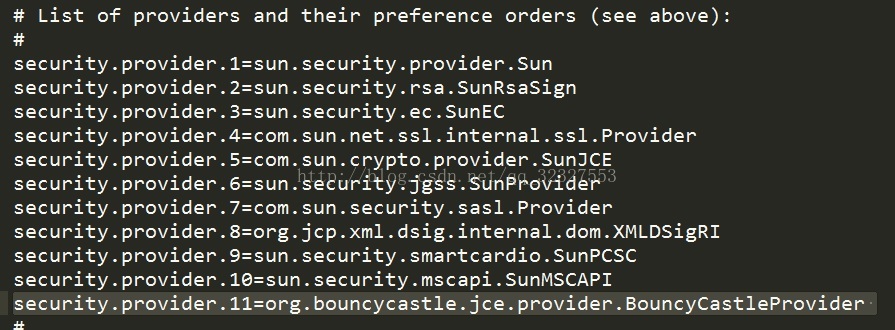
2.添加扩展jar文件
还是在java安装目录,jre/lib/ext目录下,将bcprov-jdk15-135.jar 放进去,如果不行就换个版本,或者几个版本同时进去
至此,问题基本上就解决了。
2.
But if You change server from JBoss to other (for example Glassfish) You have the same problem.
The better solition for me are changes in jdk.
You shoud add Bouncy Castle to security providers on Your java platform in two steps:
1. Copy BC librarys (currently bcpkix-jdk15on-149.jar, bcprov-jdk15on-149.jar) to directory $JAVA_HOME/jre/lib/ext/
2. Register BC provider: edit file $JAVA_HOME/jre/lib/security/java.security and under line
security.provider.1=sun.security.provider.Sun
add Your BC provider
security.provider.2=org.bouncycastle.jce.provider.BouncyCastleProvider
Change numbers of rest providers. The whole block of providers should be similar to:
security.provider.1=sun.security.provider.Sun
security.provider.2=org.bouncycastle.jce.provider.BouncyCastleProvider
security.provider.3=sun.security.rsa.SunRsaSign
security.provider.4=sun.security.ec.SunEC
security.provider.5=com.sun.net.ssl.internal.ssl.Provider
security.provider.6=com.sun.crypto.provider.SunJCE
security.provider.7=sun.security.jgss.SunProvider
security.provider.8=com.sun.security.sasl.Provider
security.provider.9=org.jcp.xml.dsig.internal.dom.XMLDSigRI
security.provider.10=sun.security.smartcardio.SunPCSC
Sorry, You don’t need change providers. Just add under SunPCSC provider next number of providers such as:
security.provider.10=org.bouncycastle.jce.provider.BouncyCastleProvider
BC provider does not have to be the second. Might be the last. – Krzysztof Szewczyk Jul 5 ’13 at 10:08
Thanks. It works for me. – Phat H. VU Jun 10 ’14 at 10:26